
Table of contents
Project Setup: Edit Contract Value
 Did this answer your question?😞😐😃
Project Setup: Edit Contract Value
Updated over 4 months ago Table of contentsNavigating to the Project Setup
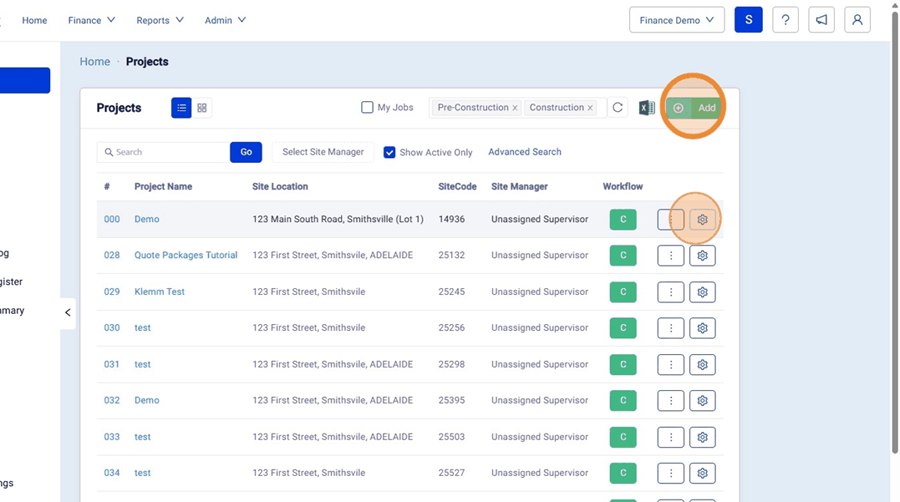
1. On the Homepage, Select "Projects"

2. Select the Add Button to create a new Project or you can edit a project from the "Gear" Icon on the right hand side of the project in the list.

Contract Values
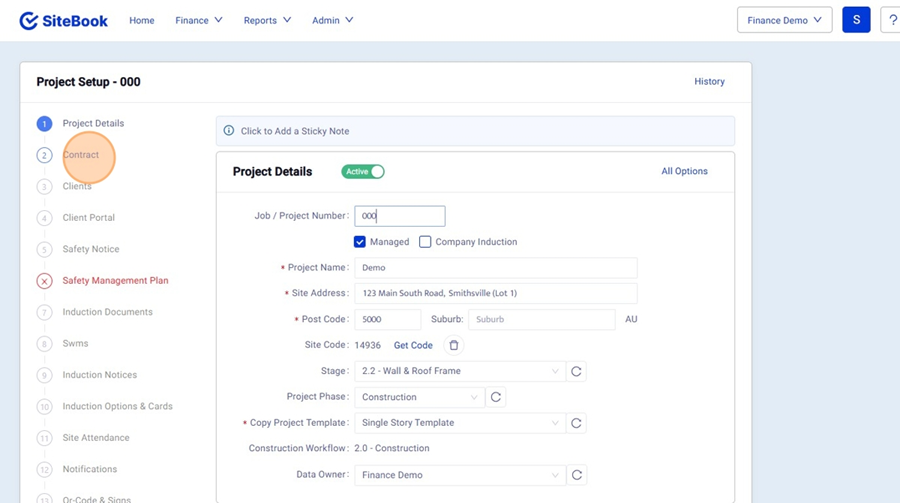
3. In the Setup Checklist, select "Contract"

4. From here you can enter the following:
· Contracted Start Date (Based on Schedule Start Date)
· Contract Amount (This is your Price Excl. Variations)
· Contracted Build Days (if Required)
· Claim Payment Terms (Client Claims)
· Contract Start Task (If a Schedule is linked this is the "Trigger" Task for the Contract Days to begin. e.g. Slab Pour)
· Cost Plus (if Required)
 Did this answer your question?😞😐😃